🐳 Docker Deployment
📋 Environment Requirements
- ✅ Docker environment installed
- ⚙️ Minimum system configuration: 2-core CPU / 2GB RAM / 5GB disk space
- 🐧 Tutorial test environment: Ubuntu Server 24.04 LTS
🛠️ 1. Prepare MaiBot Deployment Environment
1.1 📂 Create Project Directory
mkdir -p maim-bot/docker-config/{mmc,adapters} && cd maim-bot1.2 📥 Get Docker Compose File
wget https://raw.githubusercontent.com/Mai-with-u/MaiBot/main/docker-compose.yml🔄 Alternative Download Method
If GitHub direct connection is unstable, use a mirror source:bashwget https://fastly.jsdelivr.net/gh/Mai-with-u/MaiBot@main/docker-compose.yml
For local build images, jump to Local Build Process
⚙️ 2. MaiBot Environment Configuration
2.1 📝 Prepare Configuration File Templates
# Get core component configuration template
wget https://raw.githubusercontent.com/MaiM-with-u/MaiBot/main/template/template.env \
     -O docker-config/mmc/.env
# If GitHub direct connection is unstable, use mirror source: https://fastly.jsdelivr.net/gh/Mai-with-u/MaiBot@main/template/template.env
Get adapter's config.toml
wget https://github.com/MaiM-with-u/MaiBot-Napcat-Adapter/raw/refs/heads/main/template/template_config.toml \
     -O docker-config/adapters/config.toml
# If GitHub direct connection is unstable, use mirror source: https://fastly.jsdelivr.net/gh/Mai-with-u/MaiBot-Napcat-Adapter@main/template/template_config.toml
If service names in configuration files are unavailable, replace with container names
MaiBot_Serverconfiguration can be replaced withmaim-bot-corenapcatws client can be replaced withws://maim-bot-adapters:8095
2.2 Reserved File
- This file is MaiBot runtime statistics report.
MacOS/Linux
mkdir -p data/MaiMBot && touch ./data/MaiMBot/maibot_statistics.htmlWindows
mkdir data\MaiMBot && type nul > .\data\MaiMBot\maibot_statistics.html2.3 ✏️ Modify Related Configuration
- Modify MaiBot main program environment variable file
vim docker-config/mmc/.envNeed to modify the following key parameters:
# Network listening configuration
HOST=0.0.0.0- Modify adapter configuration file
vim docker-config/adapters/config.tomlModify Napcat_Server host to 0.0.0.0
Modify MaiBot_Server host to core
[napcat_server] # Napcat connection ws service settings
host = "0.0.0.0"      # Napcat set host address
port = 8095             # Napcat set port
heartbeat_interval = 30 # Same heartbeat as Napcat settings (in seconds)

[maibot_server] # Connection to MaiBot ws service settings
host = "core" # MaiBot host address set in .env file, i.e., HOST field
port = 8000        # MaiBot port set in .env file, i.e., PORT field
2.3 📜 Uncomment docker-compose.yml eula
vim docker-compose.yml
# Uncomment the following two lines (lines 30-31)
- EULA_AGREE=bda99dca873f5d8044e9987eac417e01  # Agree to EULA
- PRIVACY_AGREE=42dddb3cbe2b784b45a2781407b298a1 # Agree to EULA
2.4 Database Management Tool
- If not using sqlite-web, uncomment chat2db and comment out sqlite-web section (or delete)
  #sqlite-web:
  #  # Note: coleifer/sqlite-web image does not support arm64
  #  image: coleifer/sqlite-web
  #  container_name: sqlite-web
  #  restart: always
  #  ports:
  #    - "8120:8080"
  #  volumes:
  #    - ./data/MaiMBot:/data/MaiMBot
  #  environment:
  #    - SQLITE_DATABASE=MaiMBot/MaiBot.db  # Your database file
  #  networks:
  #    - maim_bot

  # chat2db占用相对较高但是功能强大
  # 内存占用约600m,内存充足推荐选此
   chat2db:
     image: chat2db/chat2db:latest
     container_name: maim-bot-chat2db
     restart: always
     ports:
       - "10824:10824"
     volumes:
       - ./data/MaiMBot:/data/MaiMBot
     networks:
       - maim_bot
2.5 Directory Structure
- After current configuration, directory structure should be as follows
.
├── docker-compose.yml
├── data
    ├── MaiMbot
        └── maibot_statitics.html
└── docker-config
    ├── adapters
    │   └── config.toml
    └── mmc
        └── .env
🚀 3. Initialize Container Environment
3.1 ⚡ First Start Containers to Generate Remaining Configuration Files
- Will automatically generate MaiBot main program basic configuration and model configuration files
docker compose up -d && sleep 15 && docker compose down3.2 🔧 Adjust MaiBot Configuration
Please modify according to your needs Configuration file related instructions see Configuration Guide
bot_config.toml: Basic configuration file, contains MaiBot name, QQ number, persona, etc.
vim docker-config/mmc/bot_config.tomlmodel_config.toml: Model configuration file, contains service provider, which model to use, etc.
vim docker-config/mmc/model_config.toml🎉 4. Start MaiBot
TIP
Note: The following operations are all executed in the maim-bot directory.
4.1 🏁 Start All Components
docker compose up -d4.2 🔍 Verify Service Status
docker compose ps- Normally should show 4 containers (maim-bot-core, maim-bot-adapters, maim-bot-napcat, sqlite-web[or chat2db]) with status
running
NAME                IMAGE                           COMMAND                  SERVICE     CREATED          STATUS          PORTS
maim-bot-adapters   unclas/maimbot-adapter:latest   "python main.py"         adapters    34 minutes ago   Up 34 minutes   8095/tcp
maim-bot-core       sengokucola/maimbot:main        "python bot.py"          core        34 minutes ago   Up 34 minutes   8000/tcp
maim-bot-napcat     mlikiowa/napcat-docker:latest   "bash entrypoint.sh"     napcat      34 minutes ago   Up 34 minutes   0.0.0.0:6099->6099/tcp, [::]:6099->6099/tcp
sqlite-web          coleifer/sqlite-web             "/bin/ash -c 'sqlite…"   sqlite-web  34 minutes ago   Up 34 minutes   0.0.0.0:8120->8080/tcp
4.3 📜 Real-time Log Monitoring
- Real-time view of all container logs
docker compose logs -f- Real-time view of specific container logs
# For example, only want to see main program logs
docker compose logs -f core
🔧 5. Subsequent Management Operations
5.1 🎛️ Service Start/Stop Commands
| Operation | Command |
|---|---|
| ▶️ Start Service | docker compose up -d |
| ⏹️ Stop Service | docker compose down |
| 🔄 Force Rebuild | docker compose up -d --force-recreate |
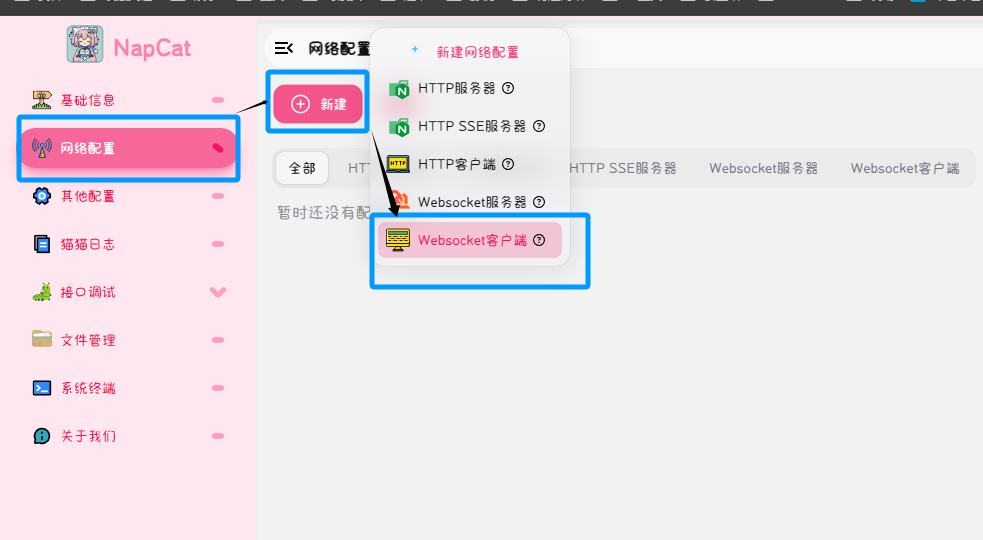
5.2 ⚙️ Napcat Configuration Entry
Access http://<server IP>:6099 to complete Napcat configuration
Network configuration uses
websocket client,urlisws://adapters:8095Example:

5.3 chat2db Parameter Settings (if enabled)
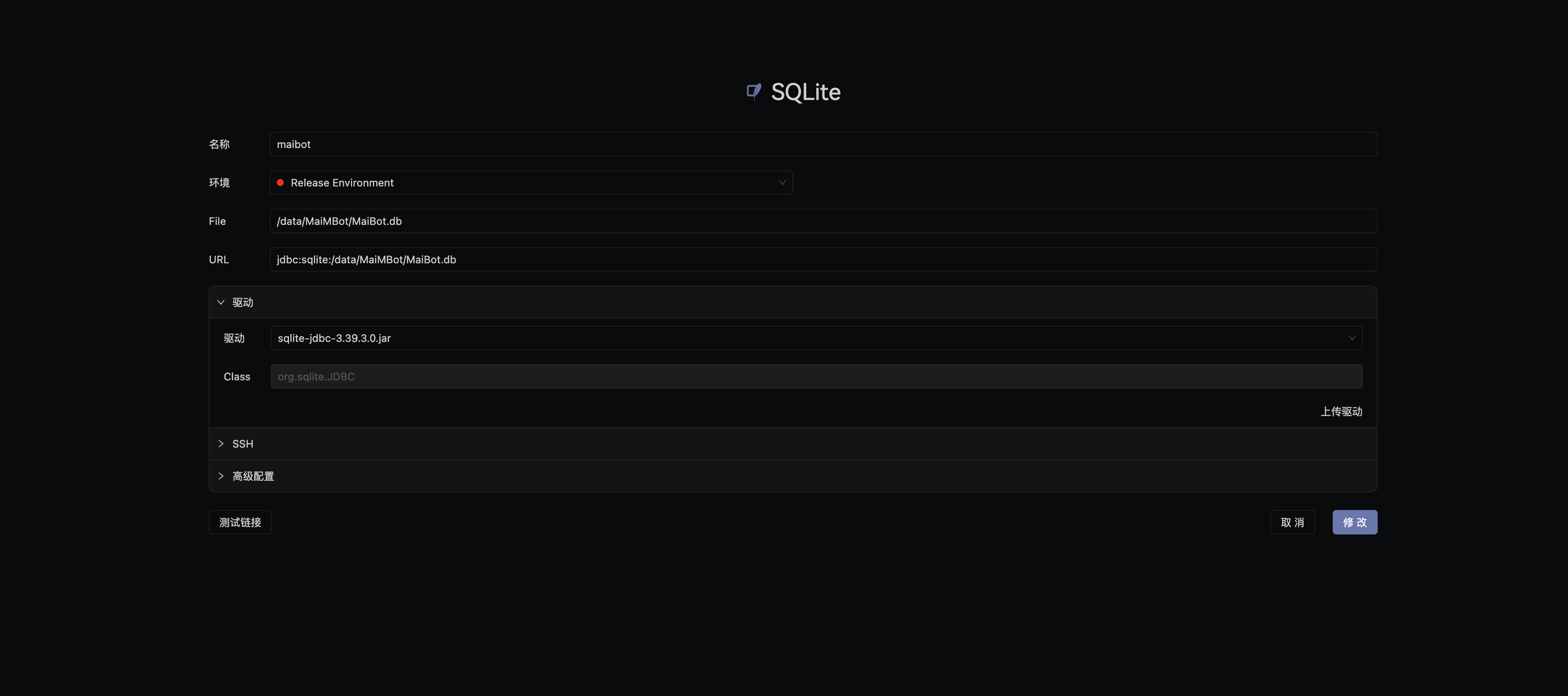
Access http://<server IP>:10824 to complete chat2db configuration
Database select
SQLite,fileis/data/MaiMBot/MaiBot.dbExample:
6. ❓ Common Issue Troubleshooting
❌ Container Startup Failure:
- 🔍 Check port conflicts (18002/8000/8095/6099/8120/10824)
If not mapped, ignore
- 🔑 Verify API key validity in
.envfile
- 🔍 Check port conflicts (18002/8000/8095/6099/8120/10824)
🔄 Configuration File Updates: After modifying configuration, execute:
bashdocker compose down docker compose up -dor:
bashdocker compose restart📊 Resource Monitoring:
bashdocker stats
💡 Tip: When encountering issues, check logs for more information:
bashdocker compose logs -f
7. Local Build Process
Prepare Necessary Files
Clone MaiBot locally via git clone
Clone MaiMBot-LPMM Package locally via git clone
Clone MaiBot-Napcat-Adapter locally via git clone
git clone https://github.com/MaiM-with-u/MaiBot.git
git clone https://github.com/MaiM-with-u/MaiMBot-LPMM.git
git clone https://github.com/MaiM-with-u/MaiBot-Napcat-Adapter.git
To switch branches, add
-b <branch name>after the link
Copy MaiMBot-LPMM to MaiBot directory
cp -r MaiMBot-LPMM MaiBot/MaiMBot-LPMMPull required images
sudo docker pull python:3.13.5-slim-bookworm
sudo docker pull python:3.13.5-slim
sudo docker pull ghcr.io/astral-sh/uv:latest
Run build
cd MaiBot
sudo docker build -t mmc:local .
cd ../MaiBot-Napcat-Adapter
sudo docker build -t adapters:local .
To use local build, replace docker-compose.yml image accordingly